Build Resilient LLM Applications on Vertex AI and Reduce 429 Errors
Building applications powered by Large Language Models (LLMs) on Vertex AI is exciting, but hitting a 429 error can be a frustrating roadblock. These errors signal that your requests are coming in faster than the service can handle them at that moment.
Last year, we published a guide to handling these 429 errors. In this article, we’ll dig deeper into Vertex AI’s consumption models and dives into architectural best practices for managing request flows. This way, you can build smooth, resilient, and truly scalable AI applications.
Choosing the right consumption option
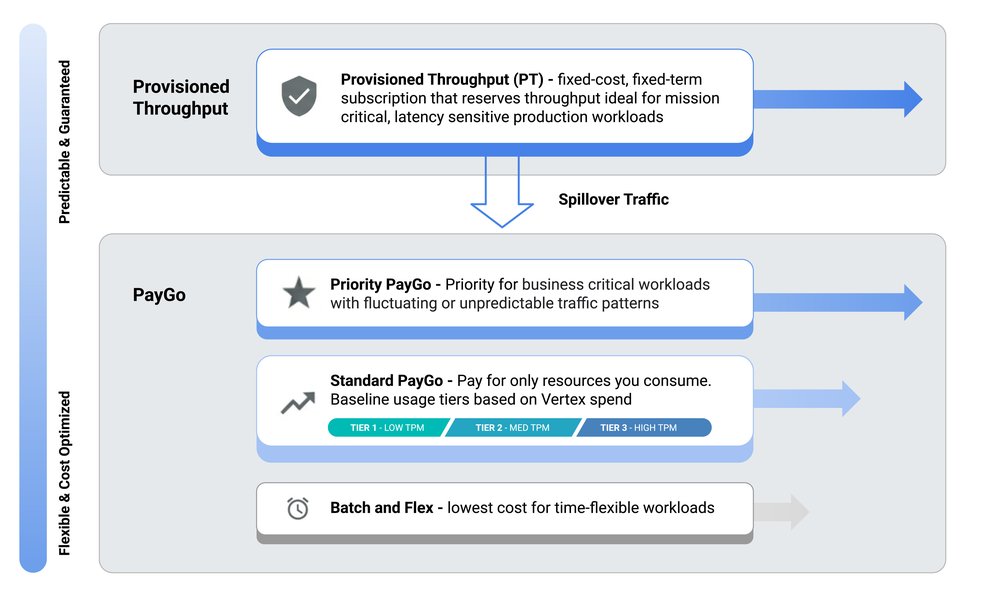
Vertex AI provides a range of consumption models designed to accommodate various API traffic types and volumes. Your primary strategy for minimizing 429 errors is selecting the consumption model that best aligns with your application’s unique traffic patterns.
Default options: The default option with Gemini on Vertex AI is Standard Pay-as-you-go (Paygo). For Standard Pay-as-you-go (Paygo) traffic, Vertex AI uses a system with Usage Tiers. This dynamic approach allocates resources from a shared pool, where your organization’s historical spend determines your Usage Tier and baseline throughput (TPM). This baseline provides a predictable performance floor for typical workloads, while still allowing your application to burst beyond it on a best-effort basis.
If your application generates critical, user-facing traffic that can be unpredictable and require higher reliability than Standard Paygo, Priority Paygo is designed for you. By adding the priority header to your requests, you signal that this traffic should be prioritized, reducing the likelihood of being throttled.
For applications with consistently high volumes of real-time traffic, Provisioned Throughput (PT) is the only consumption option that provides isolation from the shared PayGo pool, offering a stable experience even during heavy contention on PayGo. With PT, you reserve and pay for a guaranteed throughput, ensuring your important traffic flows smoothly. To learn more about PT on Vertex AI, visit our guide here.
Cost-effective options: For traffic that isn't latency sensitive, Vertex AI offers more cost-effective options. The Flex PayGo is suited for latency-tolerant traffic, processing requests at a lower price. Large-scale, asynchronous jobs, such as offline analysis or bulk data enrichment, are best handled by Batch. This service manages the entire workflow, including scaling and retries, over a longer period (around 24 hours), insulating your main application from this heavy load.
Complex applications and hybrid approaches: Complex applications often leverage a hybrid approach: PT for essential real-time traffic, Priority Paygo for fluctuating traffic, Standard Paygo for general requests, and Batch/Flex for latency-tolerant and offline request flows.
Five ways to reduce 429 errors on Vertex AI
1. Implement smart retries
When your application encounters a temporary overload error like a 429 (Resource Exhausted) or 503 (Service Unavailable), an immediate retry is not recommended. The best practice is to implement a retry strategy called Exponential Backoff with Jitter. Exponential backoff means that the delay between retry attempts increases exponentially usually up to a predefined maximum delay. This gives the service time to recover from the overload condition.
*
SDK & libraries: The Google Gen AI SDK includes native retry behavior that can be configured via HttpRetryOptions in client parameters. However, you can also leverage specialized libraries like Tenacity (for Python) or build a custom solution. For a deeper dive, refer to this blog post.
*
Agentic workflows: For developing agents, the Agent Development Kit (ADK) offers a Reflect and Retry plugin that builds resilience into AI workflows by automatically intercepting 429 errors.
*
Infrastructure & Gateway: Another robust option for building resilience is circuit breaking with Apigee, which enables you to manage traffic distribution and implement graceful failure handling.
2. Leverage global model routing
Vertex AI's infrastructure is distributed across multiple regions. By default, if you target a specific regional endpoint, your request is served from that region. This means your application's availability is tied to the capacity of that single region. This is where the global endpoint becomes an effective tool for enhancing availability and resilience. Instead of being locked into one region, the global endpoint routes your traffic across a fleet of regions where there may be more availability, reducing the potential error rate.
3. Reduce payload via context caching
An effective way to reduce the load on Vertex AI is to avoid making calls for repetitive queries. Many production applications, especially chatbots and support systems, see similar questions asked frequently. Instead of re-processing these, you can implement context caching. With Context Caching, Gemini reuses precomputed cached tokens, allowing you to reduce your API traffic and throughput. This not only saves costs but also reduces latency for repeated content within your prompts.
4. Optimize prompts
Reducing the token count in each request directly lowers your TPM consumption and costs.
* Summarization with Flash-Lite: Before sending a long conversation history to a model like Gemini Pro, use a lightweight model like Gemini 2.5 Flash-Lite to summarize the context.
* Agent memory optimization: For Agentic workloads you can leverage Vertex AI Agent Engine Memory Bank. Features like Memory Extraction and Consolidation allow you to distill meaningful facts from a conversation, ensuring your agent remains context-aware without raw chat history.
* Prompt hygiene: Review your prompts and reduce overly verbose JSON schema descriptions (if the model is already familiar) and stripping excessive whitespace or redundant formatting.
5. Shape traffic
Sudden bursts of requests are a primary cause of 429 errors. Even if your average traffic rate is low, sharp spikes can strain resources. The goal is to smoothen traffic, spreading requests out over time.
Get started
Ready to put these patterns into practice? Explore the Vertex AI samples on GitHub, or jumpstart your next project with the Google Cloud Beginner’s Guide, Vertex AI quickstart or start building your next AI agent with the Agent Development Kit (ADK) 🔗 Google IA
https://cloud.google.com/blog/products/ai-machine-learning/reduce-429-errors-on-vertex-ai/?utm_source=dlvr.it&utm_medium=blogger

Last year, we published a guide to handling these 429 errors. In this article, we’ll dig deeper into Vertex AI’s consumption models and dives into architectural best practices for managing request flows. This way, you can build smooth, resilient, and truly scalable AI applications.
Choosing the right consumption option
Vertex AI provides a range of consumption models designed to accommodate various API traffic types and volumes. Your primary strategy for minimizing 429 errors is selecting the consumption model that best aligns with your application’s unique traffic patterns.
Default options: The default option with Gemini on Vertex AI is Standard Pay-as-you-go (Paygo). For Standard Pay-as-you-go (Paygo) traffic, Vertex AI uses a system with Usage Tiers. This dynamic approach allocates resources from a shared pool, where your organization’s historical spend determines your Usage Tier and baseline throughput (TPM). This baseline provides a predictable performance floor for typical workloads, while still allowing your application to burst beyond it on a best-effort basis.
If your application generates critical, user-facing traffic that can be unpredictable and require higher reliability than Standard Paygo, Priority Paygo is designed for you. By adding the priority header to your requests, you signal that this traffic should be prioritized, reducing the likelihood of being throttled.
For applications with consistently high volumes of real-time traffic, Provisioned Throughput (PT) is the only consumption option that provides isolation from the shared PayGo pool, offering a stable experience even during heavy contention on PayGo. With PT, you reserve and pay for a guaranteed throughput, ensuring your important traffic flows smoothly. To learn more about PT on Vertex AI, visit our guide here.
Cost-effective options: For traffic that isn't latency sensitive, Vertex AI offers more cost-effective options. The Flex PayGo is suited for latency-tolerant traffic, processing requests at a lower price. Large-scale, asynchronous jobs, such as offline analysis or bulk data enrichment, are best handled by Batch. This service manages the entire workflow, including scaling and retries, over a longer period (around 24 hours), insulating your main application from this heavy load.
Complex applications and hybrid approaches: Complex applications often leverage a hybrid approach: PT for essential real-time traffic, Priority Paygo for fluctuating traffic, Standard Paygo for general requests, and Batch/Flex for latency-tolerant and offline request flows.
Five ways to reduce 429 errors on Vertex AI
1. Implement smart retries
When your application encounters a temporary overload error like a 429 (Resource Exhausted) or 503 (Service Unavailable), an immediate retry is not recommended. The best practice is to implement a retry strategy called Exponential Backoff with Jitter. Exponential backoff means that the delay between retry attempts increases exponentially usually up to a predefined maximum delay. This gives the service time to recover from the overload condition.
*
SDK & libraries: The Google Gen AI SDK includes native retry behavior that can be configured via HttpRetryOptions in client parameters. However, you can also leverage specialized libraries like Tenacity (for Python) or build a custom solution. For a deeper dive, refer to this blog post.
*
Agentic workflows: For developing agents, the Agent Development Kit (ADK) offers a Reflect and Retry plugin that builds resilience into AI workflows by automatically intercepting 429 errors.
*
Infrastructure & Gateway: Another robust option for building resilience is circuit breaking with Apigee, which enables you to manage traffic distribution and implement graceful failure handling.
2. Leverage global model routing
Vertex AI's infrastructure is distributed across multiple regions. By default, if you target a specific regional endpoint, your request is served from that region. This means your application's availability is tied to the capacity of that single region. This is where the global endpoint becomes an effective tool for enhancing availability and resilience. Instead of being locked into one region, the global endpoint routes your traffic across a fleet of regions where there may be more availability, reducing the potential error rate.
3. Reduce payload via context caching
An effective way to reduce the load on Vertex AI is to avoid making calls for repetitive queries. Many production applications, especially chatbots and support systems, see similar questions asked frequently. Instead of re-processing these, you can implement context caching. With Context Caching, Gemini reuses precomputed cached tokens, allowing you to reduce your API traffic and throughput. This not only saves costs but also reduces latency for repeated content within your prompts.
4. Optimize prompts
Reducing the token count in each request directly lowers your TPM consumption and costs.
* Summarization with Flash-Lite: Before sending a long conversation history to a model like Gemini Pro, use a lightweight model like Gemini 2.5 Flash-Lite to summarize the context.
* Agent memory optimization: For Agentic workloads you can leverage Vertex AI Agent Engine Memory Bank. Features like Memory Extraction and Consolidation allow you to distill meaningful facts from a conversation, ensuring your agent remains context-aware without raw chat history.
* Prompt hygiene: Review your prompts and reduce overly verbose JSON schema descriptions (if the model is already familiar) and stripping excessive whitespace or redundant formatting.
5. Shape traffic
Sudden bursts of requests are a primary cause of 429 errors. Even if your average traffic rate is low, sharp spikes can strain resources. The goal is to smoothen traffic, spreading requests out over time.
Get started
Ready to put these patterns into practice? Explore the Vertex AI samples on GitHub, or jumpstart your next project with the Google Cloud Beginner’s Guide, Vertex AI quickstart or start building your next AI agent with the Agent Development Kit (ADK) 🔗 Google IA
https://cloud.google.com/blog/products/ai-machine-learning/reduce-429-errors-on-vertex-ai/?utm_source=dlvr.it&utm_medium=blogger


No hay comentarios.